

Description
Download Cigati MSG to PDF Converter – Free, Secure & Fast MSG to PDF Conversion Tool for Windows, Mac, Android & iOS
Looking for a reliable and secure way to convert MSG files to PDF? Cigati MSG to PDF Converter is the ultimate software solution for individuals and professionals who need to preserve email content, formatting, and folder structure during conversion. Whether you're managing archived emails, preparing legal documents, or organizing business correspondence, this tool ensures data integrity with every conversion. With support for bulk processing, customizable output settings, and compatibility across multiple platforms including Windows, Mac, Android, and iOS, Cigati MSG to PDF Converter simplifies the transition from MSG to PDF format. The software features an intuitive interface, advanced algorithms, and a free demo version that allows you to convert up to 50 emails without cost. You can also save converted files directly at the source location, maintain email hierarchy, and export to additional formats like PST, EML, HTML, and even import into webmail platforms like Gmail and Office 365.
Key Features of Cigati MSG to PDF Converter
One of the standout reasons why Cigati MSG to PDF Converter is trusted by professionals is its comprehensive feature set designed for both individual users and enterprise environments. First and foremost, the software supports bulk conversion of MSG files, allowing you to process hundreds of emails at once without manual intervention. This is especially useful for users migrating from older email systems or archiving historical correspondence. The tool preserves all original content, including headers, attachments, hyperlinks, and embedded images, ensuring no data loss during the conversion process.
Another powerful feature is the ability to remove duplicate emails before conversion. This helps maintain clean, organized archives and prevents redundancy in your PDF documents. Users can also choose to save converted files directly at the source location, which streamlines workflow and reduces the risk of misplacement. The software supports multiple output formats beyond PDF, including PST, EML, HTML, and image formats such as JPG and PNG, making it a versatile tool for various data management needs.
For cloud integration, Cigati MSG to PDF Converter allows users to import converted files directly into Gmail and Office 365, enabling seamless migration to modern email platforms. Additionally, the tool offers a customizable saving folder name, which is ideal for organizing large volumes of converted emails by date, sender, or project. With a free demo version available for up to 50 emails, users can test the software’s performance and reliability before purchasing the full license. These features make Cigati MSG to PDF Converter a must-have tool for anyone working with MSG files regularly.
How to Install and Use Cigati MSG to PDF Converter
Installing and using Cigati MSG to PDF Converter is a straightforward process, even for users with limited technical experience. Begin by visiting the official website and downloading the software. The installer is lightweight and compatible with Windows 7 and later, including Windows 10 and Windows 11. For Mac users, the application is available for macOS 10.13 and above. Additionally, mobile versions are accessible via Android and iOS app stores, offering on-the-go conversion capabilities.
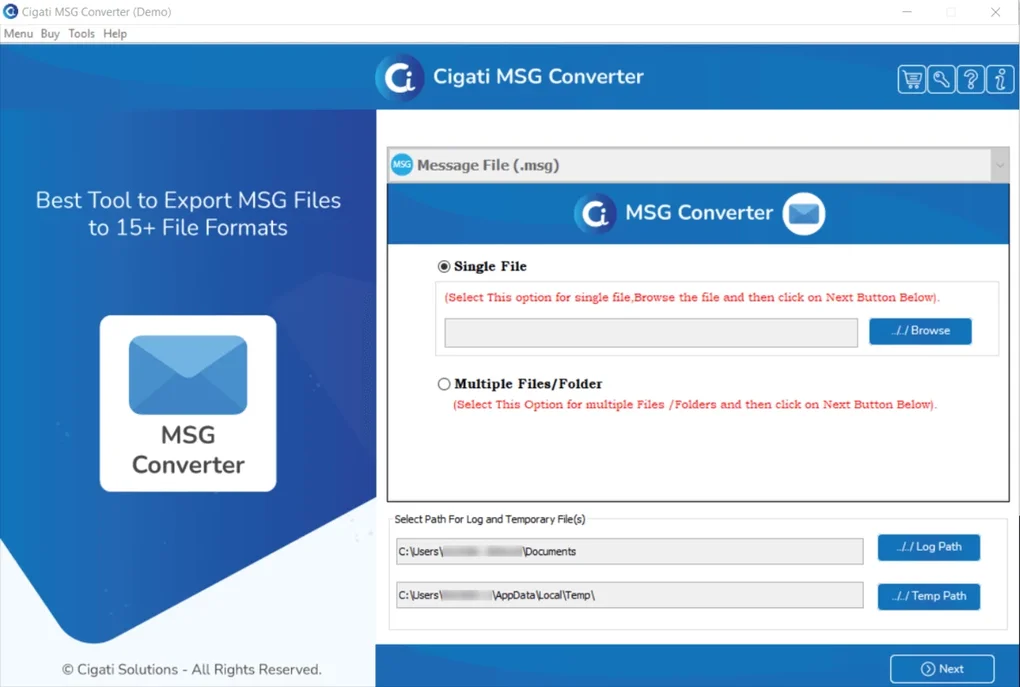
Once downloaded, run the installer and follow the on-screen instructions. The setup process takes less than two minutes and does not require any special configurations. After installation, launch the application to access the clean, intuitive interface. The main dashboard allows you to add MSG files either individually or in bulk by dragging and dropping them into the workspace. You can also browse your computer to select specific folders or entire email archives.
Next, configure your output settings. Choose PDF as the target format, and customize options such as file naming, saving location, and whether to preserve folder hierarchy. Enable the “Remove Duplicates” option if needed. Click the “Convert” button, and the software will process your files using its advanced algorithm. The progress bar provides real-time updates, and once complete, you’ll receive a notification. Converted files are saved exactly as specified, ready for sharing, archiving, or importing into cloud platforms.
For advanced users, the tool also supports command-line execution and batch processing scripts, allowing automation for large-scale conversions. This makes it ideal for IT administrators managing enterprise email migrations. The software automatically checks for updates, ensuring you always have the latest security patches and performance improvements.
Compatibility & System Requirements
Cigati MSG to PDF Converter is designed with cross-platform compatibility in mind, ensuring broad accessibility for users across different devices and operating systems. The software is officially supported on Windows 7, 8, 10, and 11, offering full functionality with no performance degradation. For Mac users, the application runs smoothly on macOS 10.13 (High Sierra) and later versions, including macOS Ventura and Sonoma.
Mobile users are not left behind—Cigati MSG to PDF Converter is available as a dedicated app on both Android and iOS platforms. The mobile apps provide core conversion features, including MSG to PDF, image export, and cloud import, making it easy to convert emails while on the move. These apps are optimized for touch interfaces and support file transfers via cloud services like Dropbox and Google Drive.
System requirements are modest, ensuring compatibility even on older hardware. A minimum of 2 GB RAM and 500 MB of free disk space is recommended. The software does not require a dedicated graphics card and runs efficiently on most modern processors. Internet access is only needed for updates and cloud integrations, not for the core conversion process, making it ideal for offline environments.
Additionally, the tool supports various MSG file types, including those created by Microsoft Outlook, Exchange Server, and other email clients. It handles encrypted MSG files with password protection and maintains metadata integrity throughout the conversion. This level of compatibility makes Cigati MSG to PDF Converter a go-to solution for users managing legacy email systems, legal documentation, or corporate archives.
Pros and Cons of Cigati MSG to PDF Converter
- Pros:
- Supports bulk conversion of MSG files with no data loss
- Preserves email structure, attachments, and metadata
- Free demo version for testing up to 50 emails
- Customizable output folder names and file naming
- Exports to multiple formats: PDF, PST, EML, HTML, JPG, PNG
- Direct import into Gmail and Office 365
- Removes duplicate emails before conversion
- Available on Windows, Mac, Android, and iOS
- Lightweight and fast processing with minimal system impact
- Cons:
- Full version requires a paid license for unlimited use
- Mobile app has slightly fewer features than desktop version
- Advanced automation features are limited to pro users
- No built-in OCR for scanned MSG files (text extraction not supported)
- Customer support response time can vary during peak hours
Frequently Asked Questions (FAQ)
Can I convert MSG files to PDF for free?
Yes, Cigati MSG to PDF Converter offers a free demo version that allows you to convert up to 50 emails without cost. This is ideal for testing the software’s performance and ensuring it meets your needs before purchasing the full license.
Is Cigati MSG to PDF Converter compatible with Outlook?
Absolutely. The software is specifically designed to work with MSG files generated by Microsoft Outlook and other email clients. It preserves all original content, including attachments, hyperlinks, and formatting.
Can I convert MSG files to other formats besides PDF?
Yes, Cigati MSG to PDF Converter supports exporting to multiple formats, including PST, EML, HTML, JPG, and PNG. This flexibility makes it suitable for various data migration and archiving tasks.
Does the software preserve email folder hierarchy?
Yes, one of the key strengths of this tool is its ability to maintain the original folder structure during conversion. This ensures that your archived emails remain organized and easy to navigate.
How do I update Cigati MSG to PDF Converter?
The software includes an automatic update feature that checks for new versions periodically. You’ll receive notifications when updates are available, and the update process is quick and seamless.
Final Verdict: Why You Should Download Cigati MSG to PDF Converter
If you’re managing a large volume of MSG files and need a reliable, secure, and fast way to convert them to PDF, Cigati MSG to PDF Converter is the best choice. Its combination of advanced features, cross-platform availability, and user-friendly design makes it suitable for both personal and professional use. Whether you're a legal professional archiving case files, a business user migrating email data, or a student organizing research emails, this tool delivers exceptional value.
With its free demo, customizable settings, and support for multiple output formats, it stands out as one of the most versatile MSG conversion tools available today. The ability to import directly into Gmail and Office 365 adds significant convenience for modern workflows.
Don’t miss out on the opportunity to streamline your email management. Download Cigati MSG to PDF Converter today and experience a seamless, secure, and efficient conversion process across all your devices.
Guides & Tutorials for Cigati MSG to PDF Converter
How to install Cigati MSG to PDF Converter
- Click the Preview / Download button above.
- Once redirected, accept the terms and click Install.
- Wait for the Cigati MSG to PDF Converter download to finish on your device.
How to use Cigati MSG to PDF Converter
This software is primarily used for its core features described above. Open the app after installation to explore its capabilities.
User Reviews for Cigati MSG to PDF Converter 0
No reviews found





